Showing posts with label itunes. Show all posts

Thursday, January 08, 2009

How To Copy MP3 from PC to iPhone using iTunes

In this post I will describe how do I copy music from my collection on PC to iPhone device using iTunes software. It's pretty easy, and you don't have to download MP3 over 3G or EDGE (and to pay extra $$ for the connection). You can do it offline. And thanks Dave Taylor for it.

Let me show you how to do it - it's pretty easy.

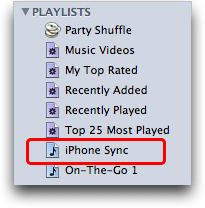
Run iTunes and choose File --> New Playlist. Now rename it to something else: for example, "iPhone Sync":Now you can just drag-n-drop music from your iTunes library (from your PC, actually) into this new playlist. When you're ready, you'll see a bunch of MP3 files happily ensconced in the playlist (remember, it's all just "pointers": the actual music files are still safely in the main music library, so if you delete something from a playlist , you haven't deleted the original music file itself):
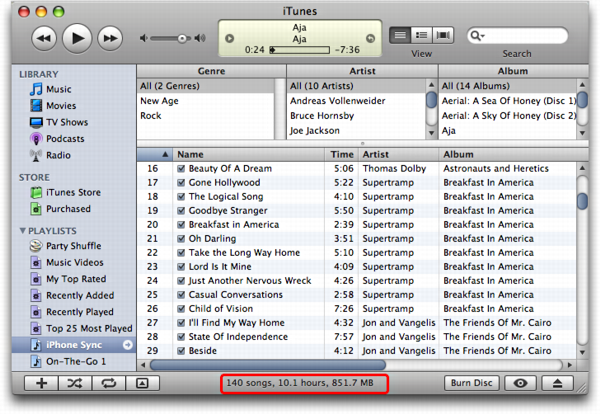
Notice here on the very bottom of the iTunes window it shows you how many songs are in the playlist, together with total size and playing time.

At this point, you need to plug in your iPhone if you haven't already done so. It'll pop up the usual summary screen:
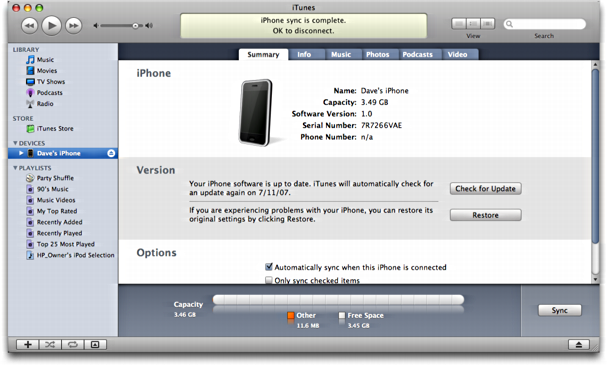
Nice. Now click on the "Music" tab and you'll see that you can select "sync playlist". Do that, then select the new iPhone sync playlist you've created, as shown here:
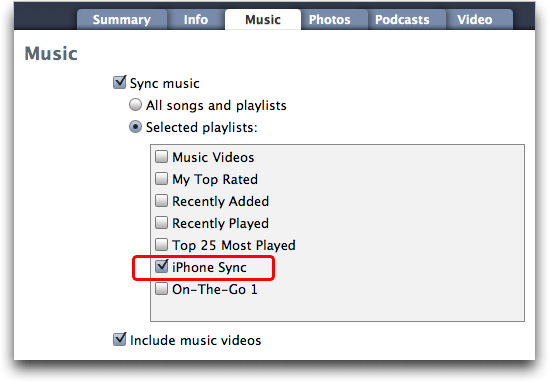

Set things up just as I have shown and that's all there is to it. Now click "Sync" in iTunes and it'll synchronize your playlist with the iPhone music library and next time you click on that button on the iPhone, your selections from you music library will be present.

Oh, and one really nice feature of creating this playlist is that you can manage it, adding and deleting songs to your heart's desire, even without your iPhone present. Whatever changes you make are instantly applied to your iPhone music library the very next time you synchronize the device.

Now that you know how to transfer music from PC to iPhone, learning how to Download Music from the Internet shouldn't be a problem for you :)

Wednesday, May 17, 2006

Where do I download music and mp3

I've just found this one:

The Cheapest and Best MP3s at MP3Sale

For $0.99, you could get a song at iTunes, MusicMatch, Napster, and many other MP3 sellers.
Of course, you'd have to download a program, suffer through DRM protections, worry about compatability with your MP3 player, and have no control over size or codec and only get a 30-sec clip of the song (and sometimes no preview at all). And you would have pay $0.99 a song. That means it would cost $4000 to fill up a 20G MP3 player, and $8000 to fill up a 40G MP3 player.


Things are different at mp3sale. You don't need any program to download MP3s, just your regular web broswer. The average MP3 costs just $0.10. Which means you could fill that 20G iPod for only $120 or that 80G iRiver for $240. Doesn't that seem more reasonable?
Unlike most other legal services the files are not protected at all. You can do whatever you want with the music files. Burn audio CDs, transfer music to your portable mp3player, there are no limits. Completely DRM free, the way music should be.

If you've never heard of mp3sale, you might have some questions:
How can it be so cheap?
Is it legal?
Is it safe to pay by credit card?

How Can it Be So Cheap?

Mp3sale is based in Russia and follows Russian copyright laws--and the Russian market. An average legit CD in Russia costs about $1 in U.S. Dollars. Copyright law in Russia makes sure some of that money goes to the artist and publisher. Just as you could stock up on cheap music in Russia, or cheap film in Singapore, mp3sale lets you buy MP3s at Russian rates and import it into the U.S.

Is it Legal?

Yes, it is. It abides by all copyright and customs laws of Russia and the U.S.
It is legal both for mp3sale.ru to sell mp3s and for American and International consumers to purchase those songs without any fear of repercussions.

mp3sale.ru has signed agreements for this with Rightholders Federation for Collective Copyright Management of Works Used Interactively (FAIR). According to license # 008/3M-05 the Internet-project mp3sale, has the right to use musical compositions by providing downloads. Under the license agreement mp3sale pays out fees to FAIR for downloaded materials that are subject to the Russian Federation Copyright And Related Rights Law. FAIR manages intellectual rights in the Russian Federation. All third party distributors licensed by FAIR are required to pay a portion of the revenue to the FAIR. FAIR in turn, is obligated to pay most of that money (aside from small portion it needs for operating expenses) to artists. Both Russian and foreign.

Is it safe to pay by credit card?

Credit card payments are processed by third party payment processor. This company is verified by companies like Visa and Mastercard. No one has ever reported credit card abuse as a result of payments made to mp3sale.ru. You are quite safe using your credit card with this company.


Sign Up for mp3sale and start downloading music 30 times cheaper than iTunes!