Showing posts with label paypal. Show all posts

Monday, October 31, 2016

How to Use PayPal With Any Music Site

Sometimes, when you find some nice mp3 music, a rare bootleg album, or a just released single of your favorite artist the only problem you might have is secure and reliable payment method. Currently, not all websites selling cheap and legal mp3 music can offer PayPal payments - but cry no more - there's an old trick how to use your PayPal account to pay for mp3 music.

We have discussed it back in 2008 and now I only wanted to add that this option has two main advantages:
1. You don't have to disclose your credit card details (as you are only using PayPal details);
2. The payments are made using PayPal gateways so you can rely on their security and reliability.

Tuesday, March 10, 2009

Using Prepaid Cards with Music Sites

Can I trust Soundike.com with my credit card and is it legal and safe to use?
What if Russian MP3 website steals my credit card details?

Those questions are quite often raise when you search for a good music site that sells legal mp3. Most of the cheapest mp3 websites are Russia-based. Some people are afraid to give away their credit card details to Russian companies because of the fraud, and other criminal issues that might cause. It is one of the main problems stopping people from downloading cheap and legal mp3 music from those websites.

There are several solutions out there that you may consider. I have described one of them earlier, it's about using PayPal to pay secure on any music site.
You can also use prepaid credit card to pay.

A prepaid credit card account is opened by depositing money into that account, much in the same way you would make a deposit to open a checking or savings account. Once you have money in your account, you're issued a prepaid credit card that can be used anywhere one would use a regular credit card. The best part of the prepaid credit card is that you can charge to your heart's content and you won't be in debt. The money is yours and once it's gone, you can't spend any more until you make another deposit. There are no bills and no interest charges. It's the same principle as using a debit card linked to a savings or checking account.

There are an increasing number of prepaid credit cards being launched. Some are specifically targeted at teens, and are available to under 18’s whilst others offer fully branded prepaid Visa or MasterCards with Chip&PIN capability and high reload limits. Many of the prepay products available have different pricing structures and fees, and it can become difficult to select the product that best suits your needs.

You can read more and compare prepaid cards here, choose and apply - here.

With your prepaid card you can go ahead and download your favorite music at a very low prices from various music sites like:
Soundike | Soundike Review
MP3Panda | MP3Panda Review
LegalSounds | LegalSounds Review
MP3Sale | MP3Sale Review

Read more about Russian MP3 Websites
Tuesday, January 22, 2008

How to Use PayPal With Any Music Site

Want to use PayPal at MP3Fiesta, Soundike, LegalSounds, or other music sites? While the majority of them don't accept PayPal directly, there is a lesser known feature of PayPal that will let you purchase music from all of these sites. It's really pretty simple, and is a great option for those who don't feel confident giving out their credit card information. Read on for a step-by-step instructions that will have you downloading music in minutes using your PayPal account.
PayPal has an often overlooked feature called the "PayPal Plug-In" that they provide as a free download directly from the PayPal website. You'll have to install this browser toolbar from PayPal in order to use this tool. After downloading and installation, the plug-in will provide you with a menu that allows you to create prepaid Mastercard with a set limit. This 'generated' credit card can then be used to purchase items anywhere where Mastercard is accepted, and is done safely - the card limit is set by you. This is great for making purchases online without giving out the credit card information of a "real" credit card.
Step 1 - Installation of the PayPal Toolbar
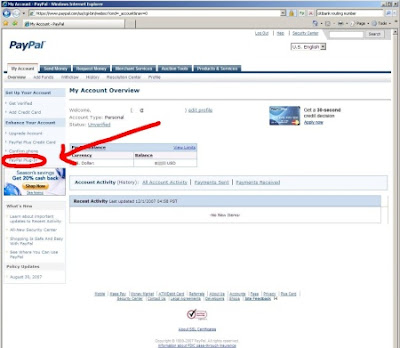
After logging into your PayPal account, look on the left side of the screen. There should be a link titled "PayPal Plugin" (circled in red in the image below).

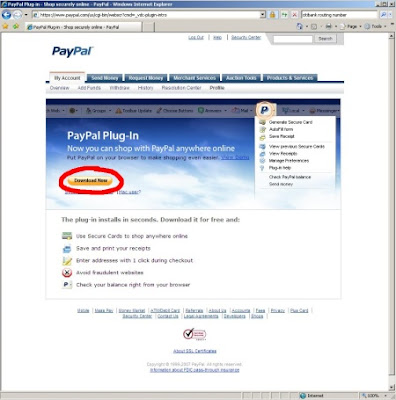
After clicking the link, you will be taken to the download screen (here is the URL leading directly to the download page) Click on the download link circled in the image below to download the toolbar (select "Run" after it downloads to install it).


After Running the Plug-In setup program you'll have a new PayPal button in your browser toolbar (Internet Explorer or Firefox both work with this Plug-In).

Step 2 - Generate a Mastercard Safely

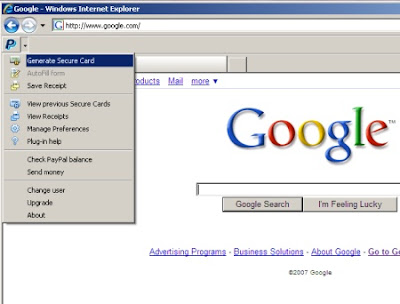
Click on "Generate Secure Card" on the PayPal toolbar menu.


If you haven't done it already, there might be some additional steps you'll need to do to enable 'Secure Cards' (you must have a verified address, etc). Once you've generated a Mastercard with an amount on it you feel comfortable with, you can then use this card in the following step.

Step 3 - Signup and Download

While your newly generated Mastercard should work basically anywhere, it has been reported that it will work at least on the following sites:


Other Notes
Unfortunately for the Europeans (and others around the world), it appears that this only works for those living in the USA. Downloading the toolbar and installing it but then signing in with an account outside of the USA doesn't seem to work either (you aren't even able to download the toolbar if you have a foreign account). If the status of this changes, it will be posted here.
If anyone has any good (or bad) experiences using this method, please post them in the comments section below.